What I learned building my first end-to-end AI app
After writing about MCP and building a small MCP server, the natural next step was wiring that server up to an actual agent and a UI, end to end. That turned into three separate repos on GitHub:
This post is a top-level tour of what each does, the technologies behind them, and the protocols that tie them together.
What the app does
It’s a validation assistant for card numbers and IBANs.
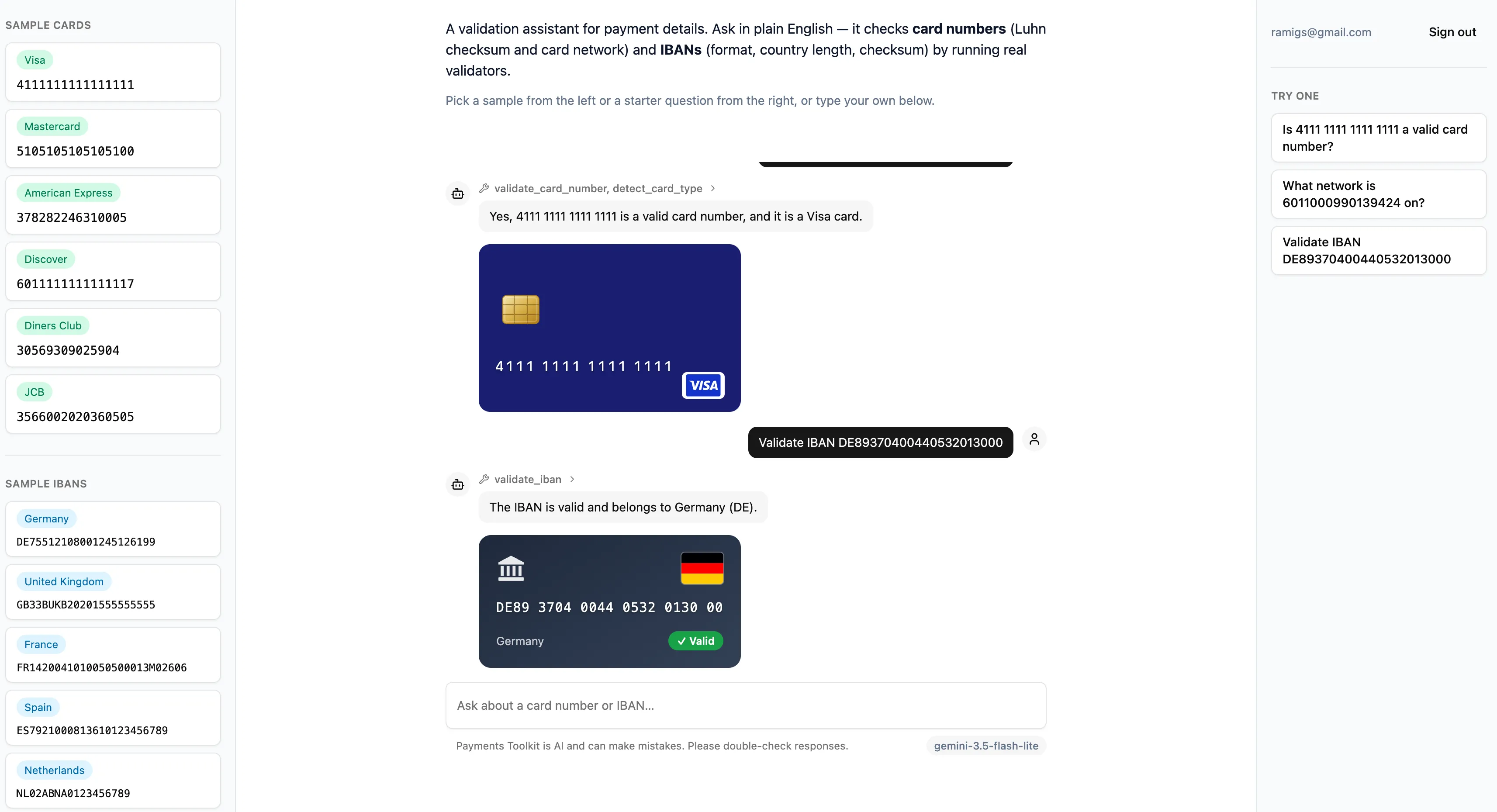
You type something like “Is DE89370400440532013000 a valid IBAN?” into a chat box. An agent decides which validation tool to call, calls it, and streams the result back.
Besides a plain-text response, the result also renders as a custom widget coming from the MCP server itself (via MCP Apps): a card widget for card network, a bank widget for IBAN country.
Architecture at a glance
Three components, each serving its own purpose:
payments-toolkit-mcpowns the validation logic and exposes it as MCP tools/resources.payments-toolkit-agentis the backend, the reasoning layer acting as an intermediary between the tools and the frontend: an MCP client to the tools, deciding which one to call, and an HTTP server exposing endpoints to the frontend, including an AG-UI one that streams that decision and its result back as a standard event stream.payments-toolkit-frontendis the UI the user actually interacts with and an AG-UI client. It has no validation logic of its own, it just renders whatever the agent streams.
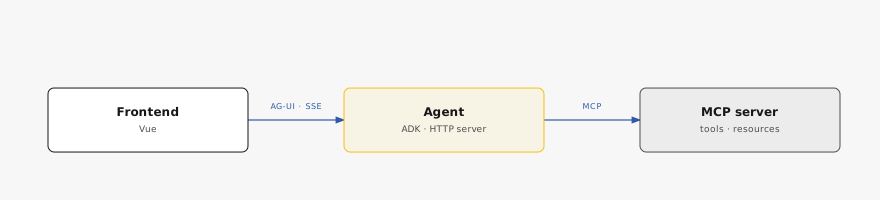
That separation is what lets each side change independently: a different frontend framework could consume the same AG-UI stream, and a different agent framework could call the same MCP server.
payments-toolkit-mcp — the tools
A Node.js app, and the part already covered in
detail: an MCP server exposing three tools
(Luhn checksum validation, card network detection, IBAN validation), a static
resource, and a prompt template. Built on the official
@modelcontextprotocol/sdk, TypeScript, Zod for schemas.
It supports both MCP transports:
- stdio (default) — a new server process per client, one instance attached to that one client.
- Streamable HTTP — a single long-running server multiple clients can connect to over the network.
Two MCP Apps widgets are also served as UI resources (ui://..., each a small
Vite-bundled HTML file): card-preview and iban-preview. More on that below.
payments-toolkit-agent — the backend
This is “the brain”: where the LLM is selected, the system prompt is written, and the agent is instantiated.
Also a Node.js app, it uses Google ADK as the agent orchestration framework: it runs the reasoning loop that decides which tool(s) to call based on the model’s output, calls them, and produces the final response.
The app also includes an HTTP server (Hono) exposing several routes, the most
relevant of which is POST /chat, which speaks AG-UI
over Server-Sent Events.
Every route is gated by Supabase bearer-token verification (JWKS) — the token the frontend attaches once the user logs in.
Because an agent’s behavior (which tool it picks, how faithfully it relays a result) isn’t deterministic, that behavior is checked with a scenario-based eval suite, grading tool selection, argument construction, and response accuracy as three separate axes per scenario.
payments-toolkit-frontend — the UI
A Vue.js SPA built on TanStack AI’s Vue client, which consumes the agent’s AG-UI stream and assembles it into typed message parts as events arrive, making the live tool-call trace possible.
Login is implemented using Supabase’s JS client @supabase/supabase-js with
email/password sign-in, producing the session token the backend verifies via
JWKS.
The “sample cards”/“sample IBANs” rails visible in the screenshot above are
one-tap quick-fill values pulled from the backend’s /sample-cards and
/sample-ibans endpoints. And while a turn is streaming, the send button
becomes a Stop button that both aborts the SSE fetch and calls the backend’s
/chat/:runId/cancel endpoint, so the model request actually dies even if a
proxy is holding the connection open.
The protocols that tie everything together
- MCP allows the agent to connect to where the deterministic validation logic actually lives: the agent decides which tool to call, and the MCP server computes and returns the result.
- AG-UI connects the agent to the frontend. It’s a standardized event stream
over SSE (
RUN_STARTED,TOOL_CALL_START/ARGS/END,TOOL_CALL_RESULT,TEXT_MESSAGE_*,RUN_FINISHED). The payoff is that neither side needs to know what framework the other is built on. This agent happens to hand-translate ADK’s internal events into AG-UI’s, since no TypeScript bridge between the two exists yet (AG-UI already maintains one for the Python ADK, so a TypeScript equivalent should become available eventually). - MCP Apps lets a tool ship its own UI alongside its result. A tool
advertises a
ui://widget resource, the agent forwards it to the frontend as aCUSTOMAG-UI event, and the frontend hosts it in a sandboxed, CSP-locked iframe. It’s what turns adetect_card_typeresult from a JSON blob into an actual card UI element.
Lessons learned
Validating card numbers and IBANs isn’t a real-world product. The goal here was never to ship something people would use. It was to actually understand, hands-on, how an MCP server, an agent, and a frontend fit together end to end.
I now have a clear picture of how it all ties together, and a much better sense of the potential of AG-UI and MCP Apps specifically, as real building blocks for how frontends are evolving in this agentic era.